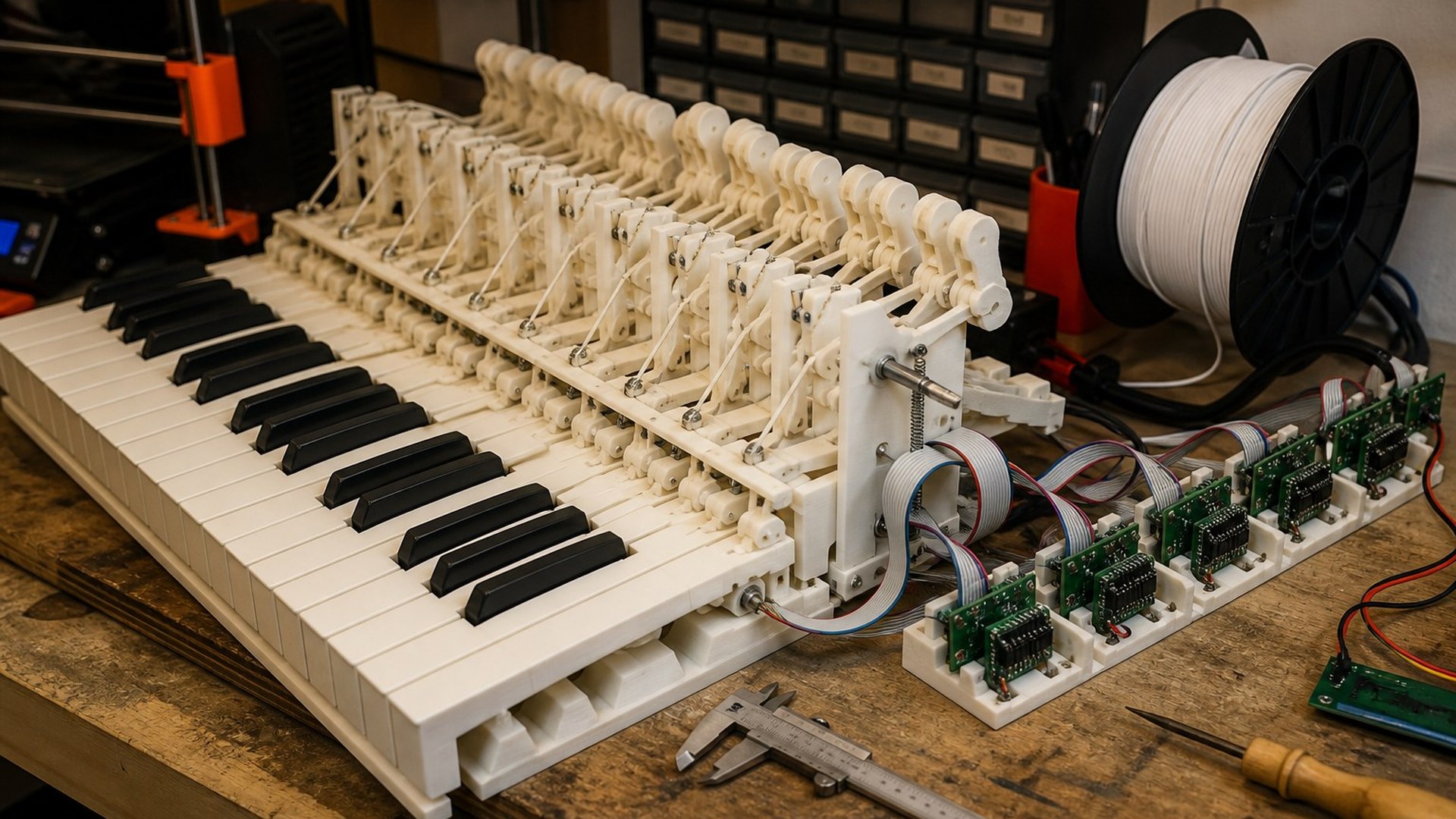

You print one key. Not a rank, not a seven-octave lie. Hackaday filed [dovetail]'s 3D-printed piano action on 29 August 2026 under the headline "3D Printed Piano Action Faithful To The Original." The builder is named in Hackaday's brackets as [dovetail]. Here's how the action works, and how you prove one module before you fill a comb.
Quin Halberg · Sunday 30 August 2026
Read next


Step by step
- Print one key
Start with one module that has a key, a hammer path, a check and a damper motion. Don't print a full rank first.
- Orient the flexure
Print the hinge so the layer lines run along the hinge, not across it, using a filament that will flex a few dozen times without snapping.
- Make the hammer leave
Watch the last millimetre of travel. If the hammer is still pushing after contact, add relief to the flexure, thin the neck or add a stop, and print the change as a new part.
- Test check and repetition
Press the key slowly, then fast, then eight times in a row. Thin a slow hinge, and move the catch if the key double-strikes.
- Add damping and a sensor
Design the rest position to close a mute or flag a sensor. Place the infrared pair where the key flag passes so the key can send MIDI note on, note off and velocity.
- Scale to a module
Only after the single key has survived a week of presses, print a small rank on a measured key pitch and daisy-chain the PCBs.
This desk has not corrected this file. Corrections.
The paper
Comments
Arden LuxTech correspondent30 Aug, 8:20 pm
Hackaday filed [dovetail] on 29 August. Five jobs: velocity, hammer off the string, no double-strike, quick repeats, damper on release. Print one key before you print eighty-eight. Layer lines along the hinge, not across it, and budget a second reel because the prototype still has filament on the improvement list. That is a shop brief.
Sign in to comment